Word-perfect redlines, without the enterprise overhead.
SIDETRACK compares two Word documents and produces a marked-up PDF plus a fully editable redline .docx — driven by Word's own comparison engine, so the fidelity is exactly what you'd get by hand. Review, accept, clean and send in minutes.
From two documents to a clean redline
Five steps, one window. Here's SIDETRACK working on a set of fictional deal documents.
Compare — and see every change instantly
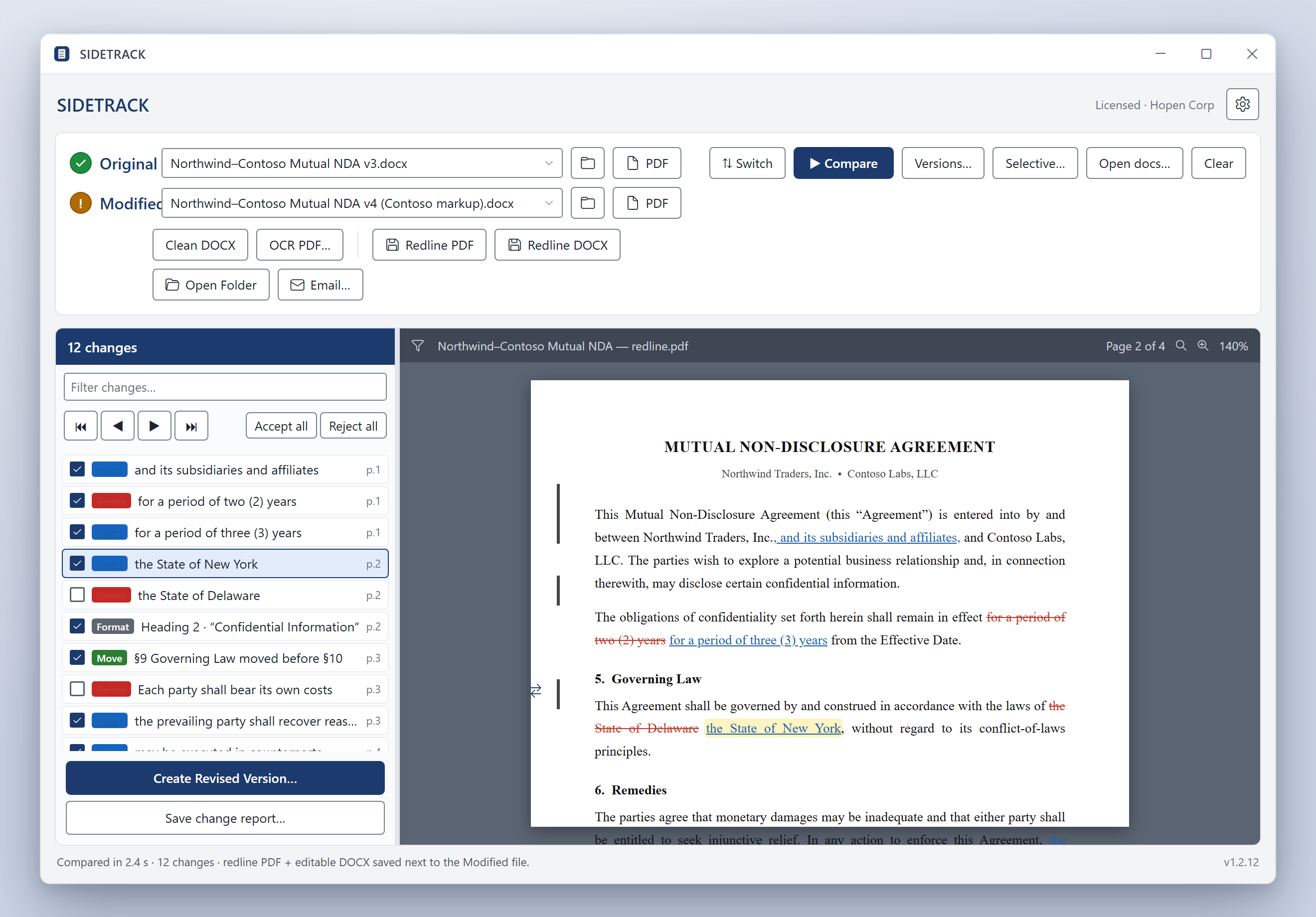
Drag in the Original and Modified documents and hit Compare. SIDETRACK drives Microsoft Word's comparison engine and shows a marked-up redline beside a navigable Change List.
- Drag-and-drop, browse, or pick a recent file
- Insert / Delete / Move / Format, each with a page number
- Click any change to jump the preview straight to it
Redlines identical to Word's own Compare
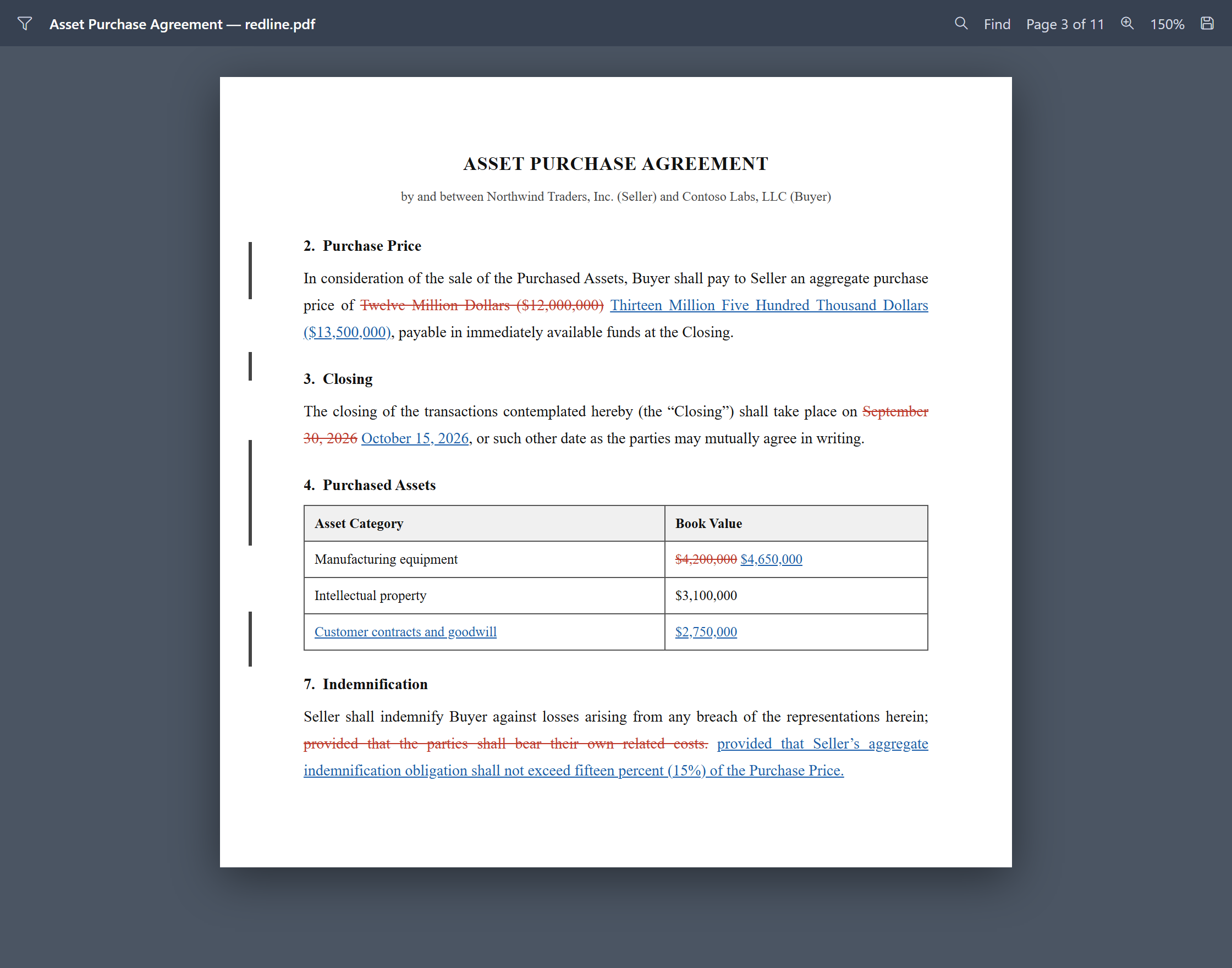
Because the engine is Word, the markup matches what colleagues and opposing counsel already expect — including tables, numbering and footnotes.
- Exports a marked-up PDF and an editable redline .docx
- Insertions, deletions, moves and formatting changes
- Change bars and house mark-up colors you control
One original vs. up to five reviewers
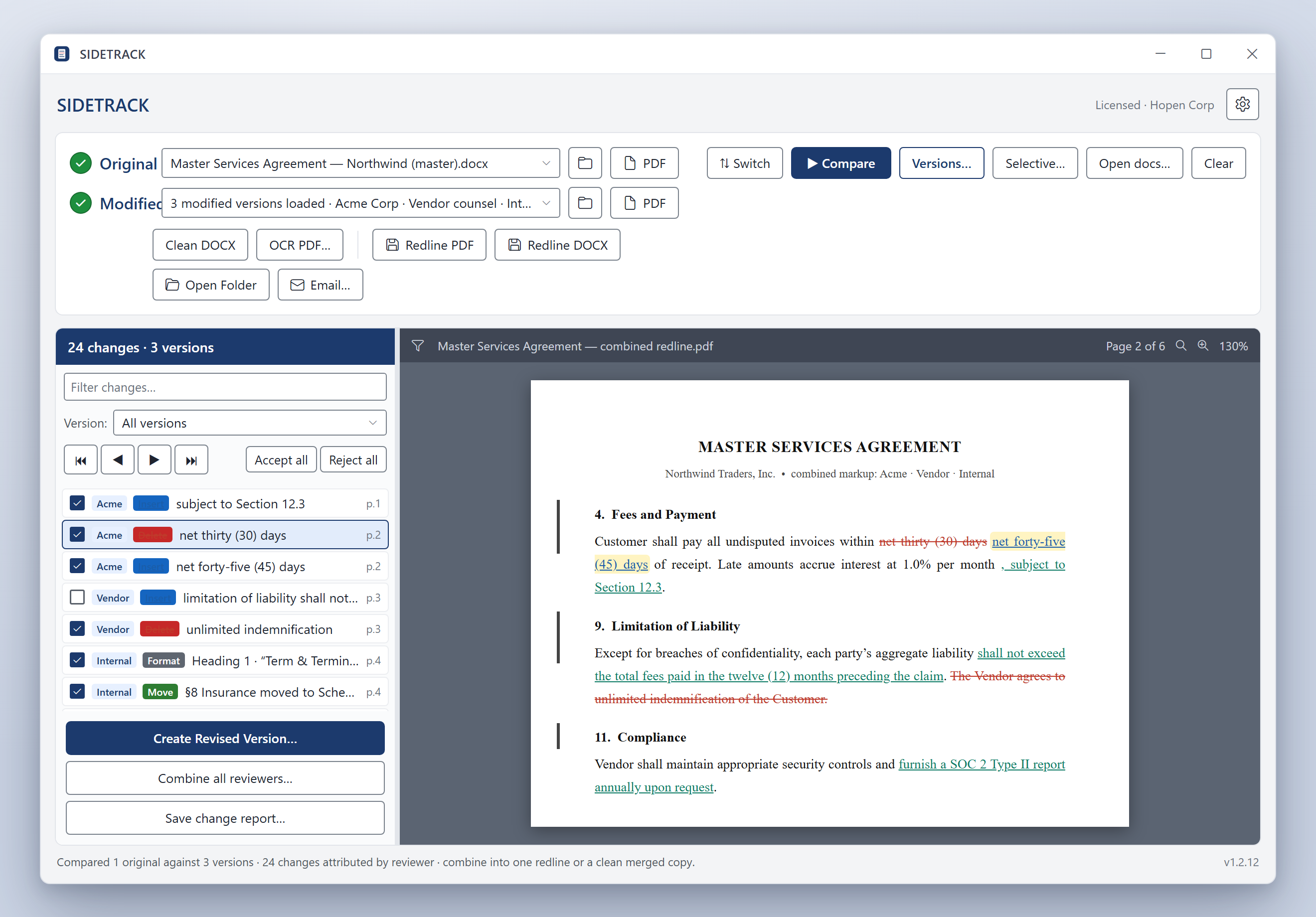
Turn a pile of returned markups into a single picture. Every edit is attributed to its source, and you can filter by version or combine everyone at once.
- Per-reviewer source chips and a version filter
- Combine into one redline, or a clean merged copy
- Build a revised version from just the changes you accept
Catch hidden metadata before you send
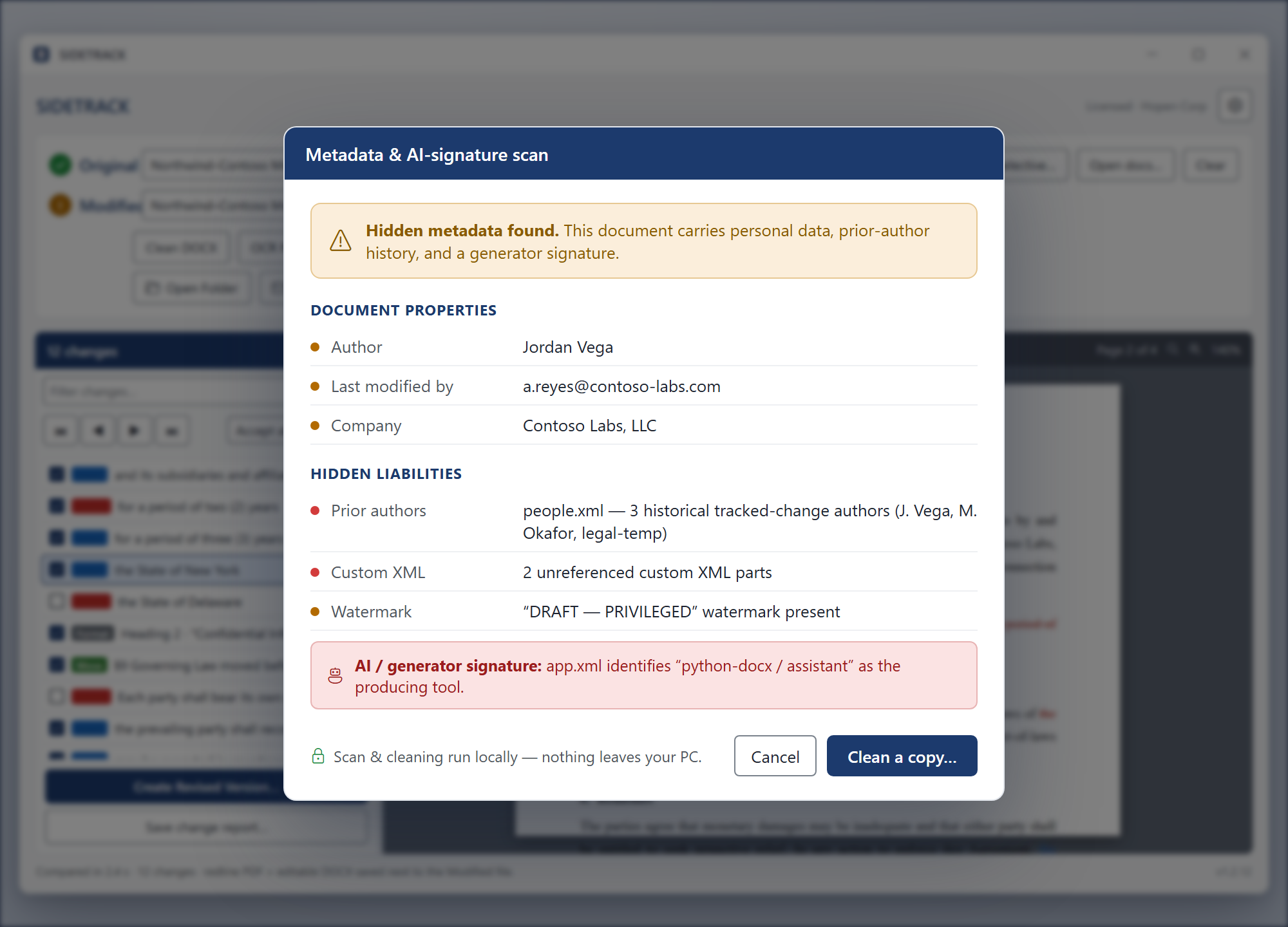
A built-in scan flags personal data, prior-author history, stray custom XML, watermarks — even AI-generator fingerprints — then writes a cleaned copy.
- Author, company, prior authors, custom XML, watermarks
- Detects AI / generator signatures left in metadata
- Scan and clean run locally — nothing leaves your PC
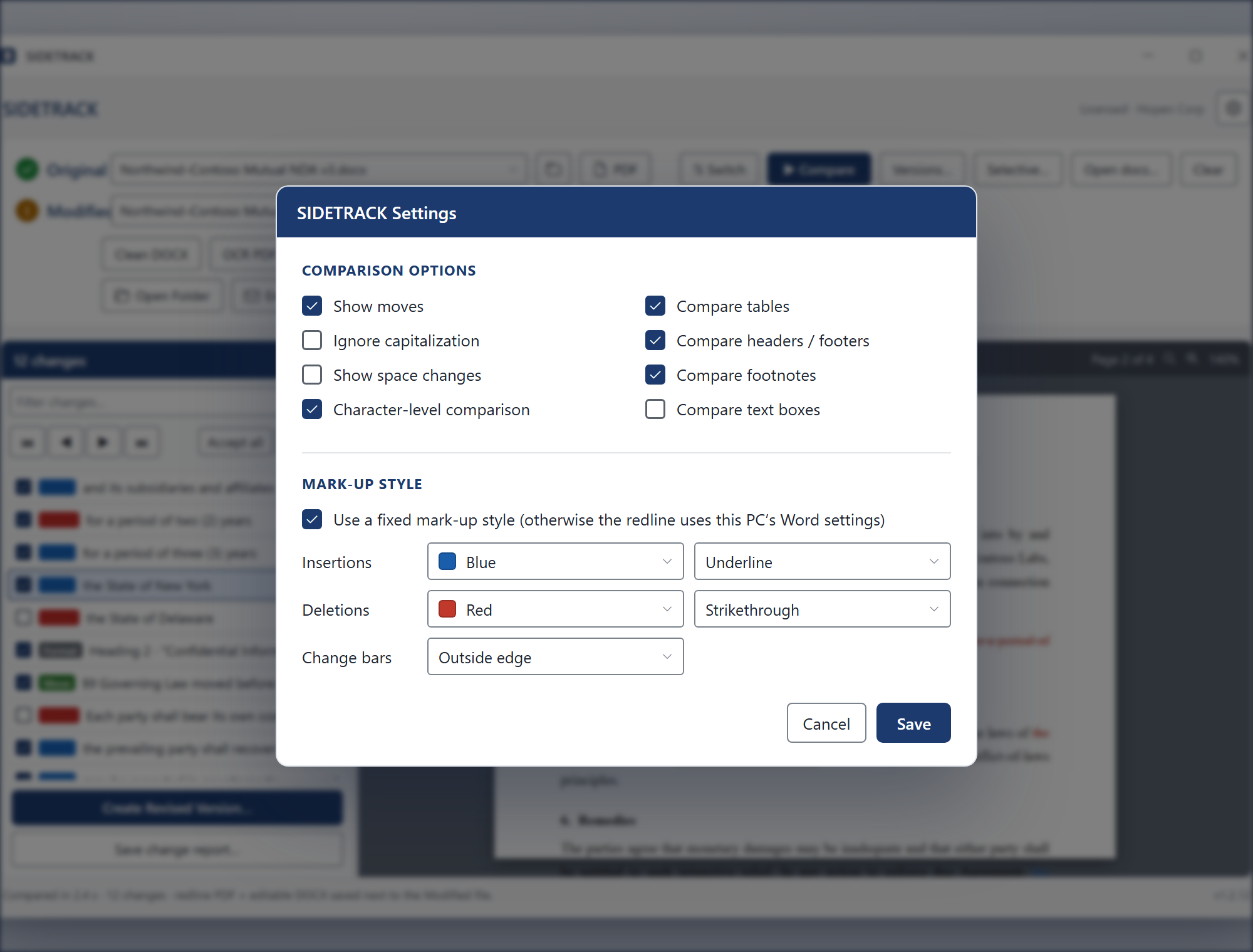
Tune the comparison to your house style
Choose exactly what to compare and how the redline looks — or just inherit this PC's Word settings. Your global Word preferences are saved and restored, never overwritten.
- Tables, headers/footers, footnotes, moves, character-level
- Insertion / deletion colors, effects and change bars
- Auto-compare, auto-open output, update on launch
Built for the way lawyers actually redline
The review features of a high-end comparison suite — minus the servers, the rollout and the per-seat invoice.
Word's own engine
COM automation of Word's CompareDocuments — the redline is exactly what Word produces by hand.
PDF + editable DOCX
Every comparison writes a marked-up PDF for review and an editable redline .docx for further markup.
Change List review
Type badges, page numbers, First/Prev/Next/Last, accept/reject per change, and a clean revised version on demand.
One-to-many compare
Compare one original against up to five returned versions, attributed by reviewer, then combine them all.
Selective & open-doc compare
Compare two pasted snippets, or two documents already open in Word — no need to save first.
PDF input & OCR
Word reflows text PDFs automatically, and a built-in local OCR turns scanned, image-only PDFs into searchable ones.
Metadata & AI scrub
Scan for personal data, prior authors, custom XML, watermarks and AI signatures — and clean a copy in one click.
Email & share
Bundle the outputs into a prefilled Outlook draft — add a recipient and one-click send, or copy them to the clipboard to paste anywhere.
Local & self-updating
No cloud, no DMS, no IT project. Installs in seconds and updates itself — your documents never leave the machine.
The redlining you need. Not the platform you don't.
Litera Compare is the enterprise standard for large firms with a DMS, IT team and a budget to match. SIDETRACK delivers the everyday comparison and review workflow as a lightweight desktop app. Here's an honest, side-by-side look.
| Capability |  SIDETRACK SIDETRACK |
Litera Compare |
|---|
Try it free, then unlock unlimited output
One subscription covers one installation — and you subscribe from inside the app, so you never pay for an install that doesn't run.
14-day free trial
- Word-identical compare engine
- Marked-up PDF + redline .docx
- No watermark for 14 days
Monthly
- Unlimited comparisons
- No watermark
- Free updates
Yearly
- Everything in Monthly
- Best value for regular use
- Cancel anytime
Subscriptions are activated from inside SIDETRACK — install, run a comparison, then click Subscribe. Secure checkout is handled by PayPal.
Redline your next document in the next five minutes.
Download SIDETRACK for Windows, point it at two files, and hit Compare. No account, no rollout, no DMS required.
Download for Windows